

SUPERMAIT
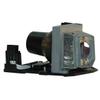
Supermait BL-FU185A Replacement Projector Lamp with Housing for Optoma DX619 / EX536 / ES526 / EW531 / EW533ST / EW536 / EX526 / EX531 / HD600X / HD66 / HD67 / HD6700 / PRO150S / PRO250X (Reusable)
£121.73
£202.88
 Free Shipping Sitewide
-
 Order within to get between
 -
Tracked Shipping on All Orders
-
 14-Day Returns
- Secure Payments
-
 24/7 Customer Support
Description
- Compatible part numbers: BL-FU185A / BL FU185A / BLFU185A / SP.8EH01G.C01 / SP.8EH01GC01 / SP8EH01GC01
- Compatible models: OPTOMA DX619 / EX536 / ES526 / EW531 / EW533ST / EW536 / EX526 / EX531 / HD600X / HD66 / HD67 / HD6700 / PRO150S / PRO250X / PRO350W / TS526 / TW536 / TX536 / DS316 / DW318 / DX319 / DS216 projectors
- Lamp type: Replacement projector lamp with housing
- Lamp life: 2,000 hours (normal) / 3,000 hours (economic)
- User protection: 150-day warranty included
- Easy installation: Housing included to minimize installation time
Supermait replacement projector lamp with housing. Part numbers: BL-FU185A / SP.8EH01G.C01 / SP.8EH01GC01. Compatible models: OPTOMA DX619 / EX536 / ES526 / EW531 / EW533ST / EW536 / EX526 / EX531 / HD600X / HD66 / HD67 / HD6700 / PRO150S / PRO250X / PRO350W / TS526 / TW536 / TX536 / DS316 / DW318 / DX319 / DS216 projectors. Installation: 1. Make sure the projector is turned off, wait at least 10 minutes for the lamp to cool, and disconnect the power cord. Locate the lamp panel, unscrew the cover, and remove it. 2. Loosen the 23 screws securing the lamp and carefully pull the lamp out of the projector. 3. Remove the new lamp from the package. Do not touch the lamp directly; handle it only by the housing. Then install the lamp correctly. 4. Insert and tighten the screws on both sides of the lamp holder. When replacing the housing, make sure the new housing is fully secured and firmly seated before operation. Reattach the cover and reinstall the screws. Reconnect the projector to the power supply and restart it. Please observe the following: 1. Make sure the room is clean and ventilated. 2. Replace or clean the projector air filter monthly. 3. Let the projector rest for 15 minutes after every 4 hours of operation. 4. Do not unplug the projector until the fan has stopped running.
Shipping and Returns
- We offer tracked shipping on all orders. Tracking information will be shared as soon as the order is dispatched.
- Please check the delivery estimate before adding a product to the cart. This is displayed for every product on the website.
- Available shipping methods and charges will be displayed at the time of checkout, depending on your exact location.
- All customers are entitled to a return window of 14 days, starting from the date of delivery of the product(s).
- Customers are advised to read our return policy for details of the return process, eligibility, refunds as well as cancellations or exchanges.
- In case of any issues or concerns about Shipping or Returns, please contact us and we will be happy to help.
Supermait.
Supermait BL-FU185A Replacement Projector Lamp with Housi...
£121.73
£202.88