

LZYCH
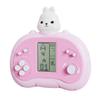
LZYCH Cute Cartoon Block Game Console, Portable, 26 Retro Games, Adjustable Difficulty, Pink
£41.52
£69.20
 Free Shipping Sitewide
-
 Order within to get between
 -
Tracked Shipping on All Orders
-
 14-Day Returns
- Secure Payments
-
 24/7 Customer Support
Description
- Cute cartoon design featuring colorful duck, rabbit, bear, and astronaut styles.
- Includes 26 block and puzzle games, including tanks, racing, shooting, memory, and classic block games.
- Adjustable game difficulty and speed, suitable for gradually increasing challenge.
- Classic retro gameplay designed to evoke childhood nostalgia.
- Simple controls that children can learn quickly and use independently.
- Portable gift for home, parks, or travel; requires 2 AAA batteries, not included. Console size: 12.7 11 3.9 cm; weight: 73 g.
Product description Game list: A. Tanks War: Use the Up/Down/Left/Right buttons to control direction; press the Rotate button to fire shells. B. Racing game: Use the Left/Right buttons to control direction; press the Rotate button to accelerate. C. Memory Challenge: Memorize the displayed directions and their frequency, then press the corresponding Up/Down/Left/Right buttons according to their position and frequency. D. Shooting game: Use the Left/Right buttons to control direction; press the Rotate button to fire. E. Ball obstacle game: Use the Up/Down/Left/Right buttons to control direction; press the Rotate button to accelerate the ball. F. Whack-a-Mole: Press the Up/Down/Left/Right buttons according to the flashing squares. G. Shooting game: Use the Left/Right buttons to control direction and press the Rotate button to fire. H. Match game: Press the Up/Down/Left/Right buttons to make the lower box match the box above, then press the Rotate button to make them collide. I. Classic block game: Use the Left/Right buttons to control direction; press the Rotate button to rotate the piece. JZ. Various block games: Use the Left/Right buttons to control direction; press the Rotate button to rotate the piece. Button instructions: 1. On/Off: Press the On/Off button to turn the game on or off. 2. Rotate: Press the Rotate button to select a game before starting. 3. Sound: Press the Sound button to turn the sound off or on. 4. S/P (Start/Pause): Press the S/P button to start or pause the selected game. 5. Reset: Press Reset to reset the entire unit. 6. Up/Down: Press Up/Down to select the pattern of the selected game. During a game, use these buttons as indicated. 7. Left/Right: Press Left/Right to select the level and speed of the selected game. During a game, use these buttons to control left and right movement. Warning: Do not play for a long time. If the product will not be used for an extended period, remove the batteries. Product with packaging size/weight: 14 13.2 4.3 cm / 107 g.
Shipping and Returns
- We offer tracked shipping on all orders. Tracking information will be shared as soon as the order is dispatched.
- Please check the delivery estimate before adding a product to the cart. This is displayed for every product on the website.
- Available shipping methods and charges will be displayed at the time of checkout, depending on your exact location.
- All customers are entitled to a return window of 14 days, starting from the date of delivery of the product(s).
- Customers are advised to read our return policy for details of the return process, eligibility, refunds as well as cancellations or exchanges.
- In case of any issues or concerns about Shipping or Returns, please contact us and we will be happy to help.
LZYCH.
LZYCH Cute Cartoon Block Game Console, Portable, 26 Retro...
£41.52
£69.20