

GOSHYDA
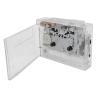
Goshyda Portable Bluetooth Cassette Player with AUX, Headphones and Cassette-to-MP3 Conversion
£110.85
£184.75
 Free Shipping Sitewide
-
 Order within to get between
 -
Tracked Shipping on All Orders
-
 14-Day Returns
- Secure Payments
-
 24/7 Customer Support
Description
- Vintage design with modern functionality; plays cassette tapes and music from a USB drive.
- 3.5 mm AUX jack for use with compatible headphones, speakers or car stereos.
- Converts cassette music to MP3 and saves it to a USB drive.
- Powered by two AA batteries (not included) or the included USB cable.
- Portable and lightweight: approximately 4.7 x 3.5 x 1.2 in; 0.44 lb.
Specifications: Item type: Bluetooth cassette player Material: ABS Battery: 2 x AA batteries (not included) Output current: 400 mA maximum Output power: 2 W maximum Track type: Two-channel stereo Tape speed: Standard 4.76 +/- 5% Recording rate: 128 KPS Data protocol: USB 2.0 Playback modes: Tape playback, USB flash drive playback, random playback and loop playback USB flash drive playback: Supports FAT32 and exFAT file systems; NTFS is not supported Audio transcription: Supported Tape speed adjustment: Supported Size: Approximately 4.7 x 3.5 x 1.2 in / 12 x 9 x 3.1 cm Instructions: Ready to use. To record a cassette in MP3 format: 1. Insert the cassette to be recorded into the player. 2. Insert a USB flash drive into the USB port. After the white indicator lights up and stays on, press the button once. The white indicator flashes slowly, indicating that recording has started. Press the tape playback button at the same time. 3. To stop recording, press the button once. The white indicator remains on. 4. To play the recorded file, press the button twice. The white indicator turns blue and starts playing the MP3 file; the blue indicator flashes slowly. Press the button once to stop playback. The blue indicator remains on. 5. Stop tape playback during playback to prevent interference. Press and hold the button to cycle through the MP3 file volume settings. 6. To return to recording mode, press the button twice. The blue indicator changes back to white. To play a cassette: 1. Headphone connection: Connect headphones to enjoy music. 2. Use the volume control to adjust the volume during playback. 3. Press the button.
Shipping and Returns
- We offer tracked shipping on all orders. Tracking information will be shared as soon as the order is dispatched.
- Please check the delivery estimate before adding a product to the cart. This is displayed for every product on the website.
- Available shipping methods and charges will be displayed at the time of checkout, depending on your exact location.
- All customers are entitled to a return window of 14 days, starting from the date of delivery of the product(s).
- Customers are advised to read our return policy for details of the return process, eligibility, refunds as well as cancellations or exchanges.
- In case of any issues or concerns about Shipping or Returns, please contact us and we will be happy to help.
Goshyda.
Goshyda Portable Bluetooth Cassette Player with AUX, Head...
£110.85
£184.75