

ACV
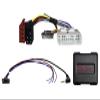
ACV Steering Wheel Control Interface for Chevrolet/Isuzu 42xiz001
£94.59
£157.65
 Free Shipping Sitewide
-
 Order within to get between
 -
Tracked Shipping on All Orders
-
 14-Day Returns
- Secure Payments
-
 24/7 Customer Support
Description
- Retains steering wheel controls after replacing the factory radio, including volume and track selection.
- Compatible with Chevrolet Colorado, S-10 Pickup, Trailblazer, and Isuzu D-MAX and MU-X models.
- Easy installation with clearly arranged connections for testing radio and steering wheel functions before final assembly.
- Depending on the vehicle equipment, buttons may be reassigned or additional functions activated.
- Made in Germany; support is available for vehicle compatibility and installation questions.
Steering wheel remote control adapter for Chevrolet/Isuzu. Retain the original steering wheel remote control functions when replacing the factory radio with an aftermarket radio. Depending on the vehicle equipment and the functions and software of the aftermarket device, individual control functions may be unavailable or replaced by other functions. Compare the adapter plugs shown with those in your vehicle and make sure they match visually and technically. Also check whether one of the specified original factory radios was installed in your vehicle. Before final assembly, test the vehicle functions, vehicle settings, and steering wheel remote control for proper operation. Our support team will be happy to help with selection: 02431-9645-96 support@acvgmbh.de Note: Analog. Connections: - 16-pin Isuzu connector - OEM steering wheel remote control to 3.5 mm jack / loose wire Dip switch settings for the aftermarket device manufacturer; see the operating instructions. Suitable for the following Chevrolet vehicles: - Chevrolet Colorado, 20122014 - Chevrolet Trailblazer, 20122017 - Chevrolet S-10, 20122016 Isuzu: - Isuzu D-MAX, 09/201205/2017 - Isuzu D-MAX, 05/201711/2020 - Isuzu MU-X, 20142019 The following signal is provided: - Steering wheel remote control Imported vehicles or vehicles with different software may be incompatible with certain functions. General installation instructions: Inspection: 1. Check all control functions and vehicle-setting functions of the OEM device. 2. Remove the OEM device with the system disconnected from power. 3. Check all interface connections for correct connection and continuity with the system disconnected from power. Connection and connection sequence: 1. Make interface settings and hardware configuration with the system disconnected from power. 2. Check the configuration of the radio connection cable. 3. Connect the radio connection cable according to the aftermarket device's operating instructions. 4. Connect all other connections according to the aftermarket device's operating instructions. 5. Connect the complete installation to the vehicle, with the power connection made last. 6. Configure the interface software according to the information in the product text and the operating instructions. 7. Configure the aftermarket device according to its operating instructions for steering wheel remote control, camera, hands-free system, antenna phantom power, and other functions. 8. Test the steering wheel remote control and vehicle functions. Changes to the interface hardware configuration or radio connection cable: 1. Make changes with the system disconnected from power. 2. After making changes, follow connection steps 5 through 8 above. If the interface or vehicle malfunctions: 1. Reinstall the OEM device. 2. Operate the OEM device. 3. Allow the CAN bus to enter standby mode. 4. Check the interface hardware configuration. 5. After the CAN bus enters standby mode, follow connection steps 5 through 8 above. Connections, connection changes, alternative connections, loose-wire connections, or loose-wire extensions specified in the notes or operating instructions are provided solely for guidance and information for trained specialist personnel. Any additional connections, wiring-harness configuration changes, or use of alternative connections or loose-wire extensions must meet the following requirements: 1. Connections and changes must be carried out only by trained specialist personnel. 2. Before connection, check whether manufacturer approval is required and whether the changes could affect the manufacturer's warranty conditions. 3. Before connection, test the function and correctness by measurement and by comparison with the vehicle's wiring diagram. 4. Connections and changes are made at the user's own risk, without any guarantee of functionality. 5. Connections and changes are made at the user's own risk, without any guarantee against damage to the vehicle, aftermarket device, or interface. 6. Changes to the preconfigured wiring harness may void the product warranty.
Shipping and Returns
- We offer tracked shipping on all orders. Tracking information will be shared as soon as the order is dispatched.
- Please check the delivery estimate before adding a product to the cart. This is displayed for every product on the website.
- Available shipping methods and charges will be displayed at the time of checkout, depending on your exact location.
- All customers are entitled to a return window of 14 days, starting from the date of delivery of the product(s).
- Customers are advised to read our return policy for details of the return process, eligibility, refunds as well as cancellations or exchanges.
- In case of any issues or concerns about Shipping or Returns, please contact us and we will be happy to help.
ACV.
ACV Steering Wheel Control Interface for Chevrolet/Isuzu ...
£94.59
£157.65